Using the LGT-92 as a field tester
Out of the box, the Dragino LGT-92 sends only every few minutes. One downlink from The Things Stack makes it report every 30 or even 20 seconds, turning it into an affordable field tester.
Available with ProBusiness

The LGT-92 is an affordable LoRaWAN tracker from Dragino, available for all frequency bands. fieldtester.io recognises it automatically. Out of the box, though, the handy tracker is of limited use as a measuring device, because its default settings make it send data only every few minutes. If you move briskly on foot or by bike, that leaves sizeable gaps in your surveys.
With one trick you can change the interval to 30 or even 20 seconds, without any cable: with a downlink from The Things Stack.
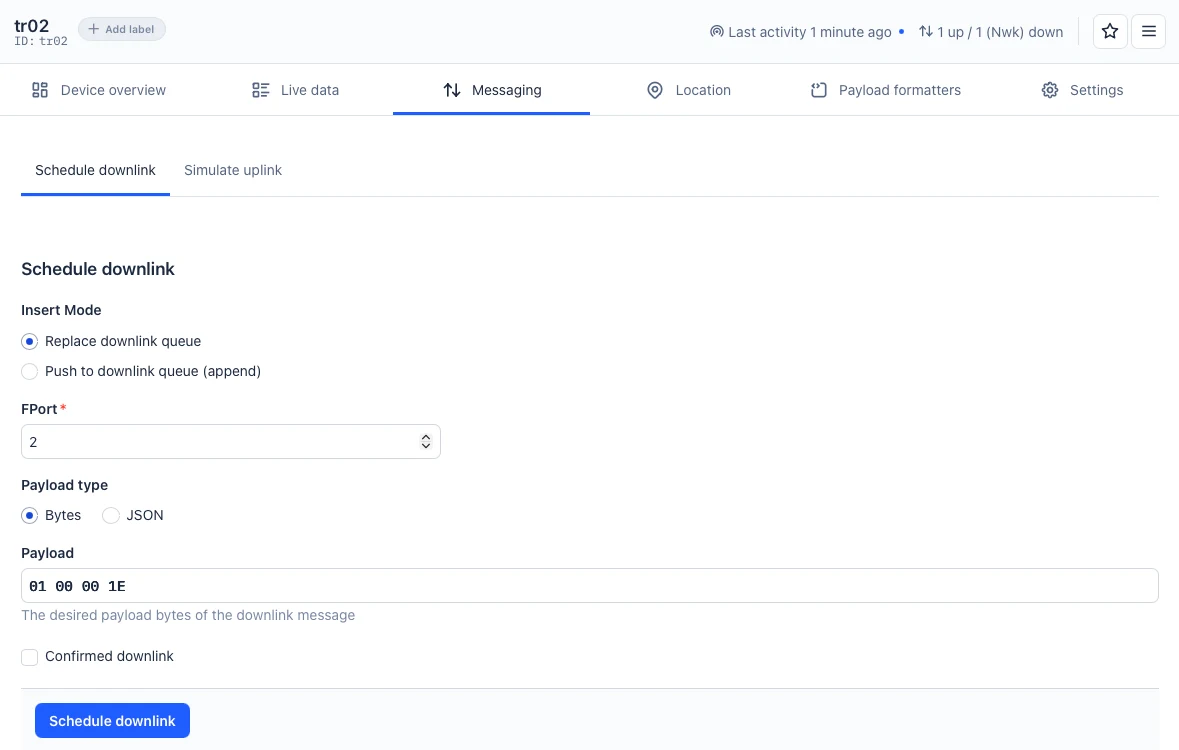
How to change the interval
- In the console of The Things Stack, open your application and, under End devices, the LGT-92.
- Go to the Messaging tab and choose Schedule downlink.
- Leave Replace downlink queue selected and enter 2 as the FPort.
- Under Payload type, choose Bytes and enter
01 00 00 1Eas the Payload. - Leave Confirmed downlink unticked and click Schedule downlink.
The LGT-92 listens only briefly after each of its own uplinks. The downlink therefore waits in The Things Stack until the tracker sends next; from then on the new interval applies. The Live data tab shows when it was delivered.
Send only one command at a time: the one delivered last always wins. So send the command to switch back only after your survey.
What the bytes mean
The first byte, 01, is the command "set transmit interval"; the three bytes after it are the seconds as a hexadecimal number:
| Interval | Payload |
|---|---|
| 20 seconds | 01 00 00 14 |
| 30 seconds | 01 00 00 1E |
| 1 minute | 01 00 00 3C |
| 20 minutes | 01 00 04 B0 |
20 seconds only work with good reception, when the tracker sends with a low spreading factor. Further from the gateway, every packet takes longer on air, and the rules for the frequency band then require longer pauses. 30 seconds are therefore the safe choice.
If you have the LGT-92 connected to its serial port through a USB adapter, the AT command AT+TDC=30000 (in milliseconds) does the same.
Switch back after the survey
A short interval costs battery and airtime. The Things Network allows each device about 30 seconds of airtime per day (Fair Use Policy). At spreading factor 7 and a 30-second interval, that is enough for about four hours of surveying, at higher spreading factors for much less. So switch the LGT-92 back to a long interval after your survey, for example to 20 minutes with 01 00 04 B0.
Measuring with fieldtester.io
Once the fieldtester.io webhook is set up in your application, fieldtester.io recognises the LGT-92 by its first uplink. Every uplink becomes a measurement point with position, signal and the gateways that received it. For a position, the LGT-92 needs open sky. Without a GPS fix, it searches for up to 150 seconds before each transmission (setting AT+FTIME) and then sends without coordinates. Indoors, uplinks therefore arrive only every few minutes, even with a short interval. Our guide shows how to set up the webhook.